

Close Menu
  • Tech Insights
  • Laptops
  • Mobiles
  • Gaming
  • Apps
  • Money
  • Latest in Tech
Facebook X (Twitter) Instagram
TechzLab – Tech News, Gadgets, Mobile, IT Updates & ReviewsTechzLab – Tech News, Gadgets, Mobile, IT Updates & Reviews
  • Tech Insights
  • Laptops
  • Mobiles
  • Gaming
  • Apps
  • Money
  • Latest in Tech
TechzLab – Tech News, Gadgets, Mobile, IT Updates & ReviewsTechzLab – Tech News, Gadgets, Mobile, IT Updates & Reviews
Home » This cross-device clipboard app solves the copy-paste problem I keep running into on my Mac
Latest in Tech

This cross-device clipboard app solves the copy-paste problem I keep running into on my Mac

By June 27, 2026No Comments3 Mins Read
Facebook Twitter Pinterest LinkedIn Tumblr Email
Share
Facebook Twitter LinkedIn Pinterest Email

I have lost count of how many times I have copied something important, copied another thing before pasting it, and then realized the first item was gone. It is a small frustration, but it happens often enough to become annoying. I recently came across ClipboardAI, which caught my attention because it goes beyond Apple’s built-in clipboard by saving copied items into a searchable history.

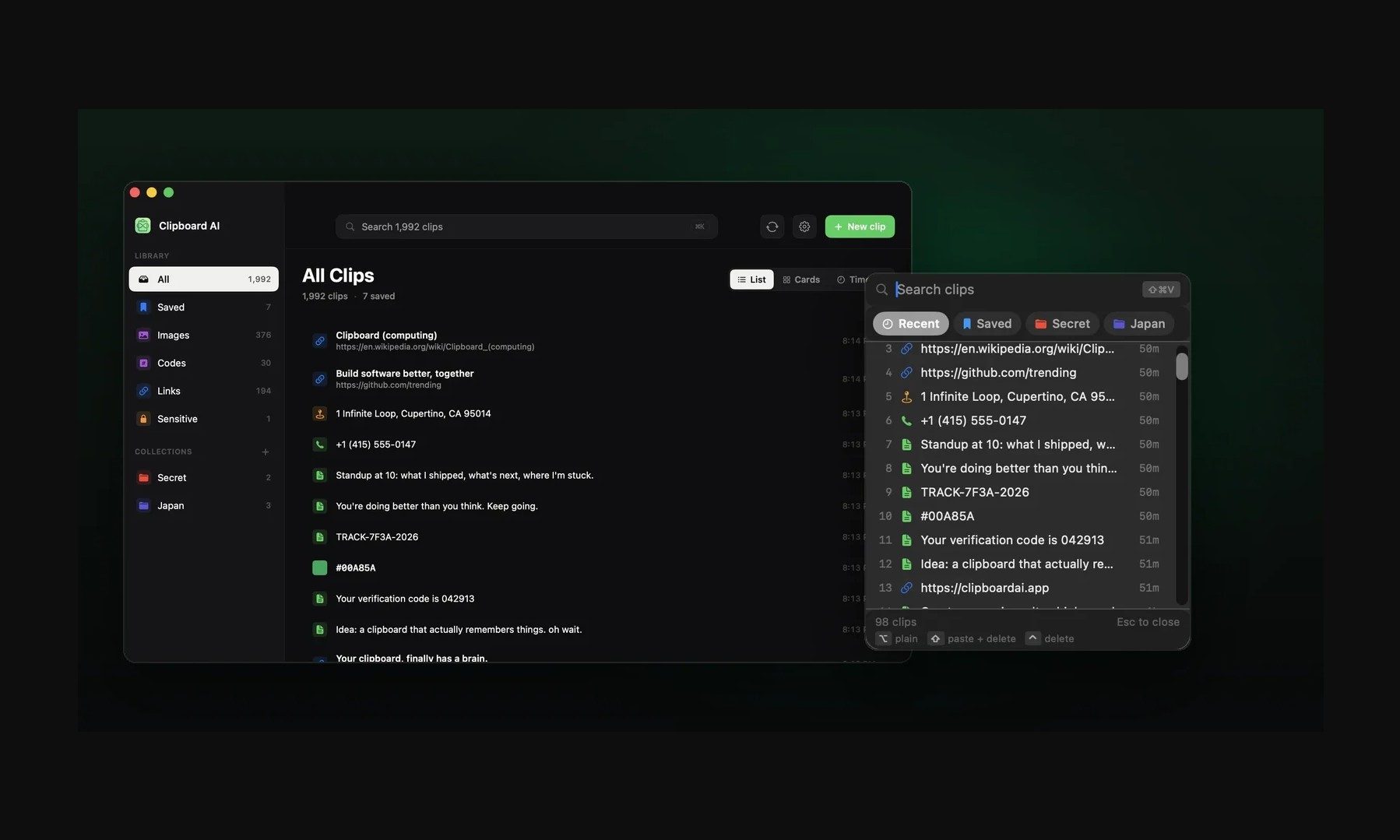
Instead of replacing the last thing you copied every time, ClipboardAI keeps a searchable record of copied text, links, codes, email addresses, phone numbers, addresses, and images across iPhone, iPad, and Mac. That means an older clip does not disappear just because you copied something new.

It saves, sorts, and brings clips back quickly

ClipboardAI uses on-device AI to sort copied items into links, codes, emails, addresses, phone numbers, text, and images. Users can also create collections for material they reuse often, including research links, templates, travel details, or saved snippets.

ClipboardAI

The keyboard extension is the feature that makes the app feel most useful. It can show up to 20 recent clips inside any iOS text field, so you do not have to leave Messages, Mail, Slack, Safari, or another app to paste something copied earlier.

The app can summarize copied text, generate link previews, detect languages, offer translations, turn lists into checklists, and solve math expressions or unit conversions. Some tools will be useful often, while others are more situational.

The privacy approach is important

Since clipboards often contain private information like passwords, codes, addresses, emails, phone numbers, and copied messages, privacy is a make-or-break factor for apps like this. ClipboardAI keeps AI features on-device, stores clips locally using SwiftData, and avoids analytics, ads, third-party SDKs, and developer-run servers.
Page, Text, File
ClipboardAI

The app also treats sensitive clips differently from regular copied items. It can detect passwords, API tokens, credit card numbers, and SSNs, and then blur them by default. Passwords can disappear after 60 seconds, and sensitive clips stay out of the keyboard extension unless the user changes that setting.

Sync runs through the user’s own iCloud account and is optional. The free version includes automatic capture, categories, search, and up to 10 saved clips. Pro adds unlimited clips, iCloud sync, the keyboard extension, AI features, and collections, with a 7-day yearly trial and a $24.99 lifetime option.

Not everyone needs a clipboard manager. But if you lose copied links, codes, notes, or addresses several times a week, ClipboardAI could be a useful replacement for Apple’s built-in clipboard.

Share. Facebook Twitter Pinterest LinkedIn Tumblr Email

Related Posts

NYT Strands hints and answers for Wednesday, July 29 (game #878)

July 29, 2026

Apple is ending the iPhone Upgrade Program, and not everyone will welcome its replacement

July 28, 2026

Chinese Companies Are Selling Vapes With Chemicals Potentially More Potent Than Nicotine

July 26, 2026
Leave A Reply Cancel Reply

Comment moderation is enabled. Your comment may take some time to appear.

This site uses Akismet to reduce spam. Learn how your comment data is processed.

Latest
  • Samsung Galaxy Z Fold 8 review: a shot in the arm for the foldables market August 3, 2026
  • Best MagSafe wallets of 2026: Expert tested and reviewed August 3, 2026
  • ‘It’s without a doubt one of the least detrimental privacy-focused solutions to your mobile experience’: I spent a month testing GrapheneOS — and it almost made me ditch my Android phone entirely July 30, 2026
  • Low-power AI could define the next era of global innovation July 30, 2026
  • NYT Strands hints and answers for Wednesday, July 29 (game #878) July 29, 2026
We are social
  • Facebook
  • Twitter
  • Pinterest
  • Instagram
  • YouTube
  • Vimeo

Subscribe to Updates

Get the latest creative news from Techzlab.

Tags
AI Amazon Anthropic Apple artificial intelligence ChatGPT cybersecurity data centers defense tech Donald Trump electric vehicles Elon Musk evergreens EVs Exclusive Fintech gemini Google Grok In Brief India Layoffs Meta Microsoft Mythos nvidia nvidia gtc Nvidia GTC 2026 Openai Perplexity Polymarket Redwood Materials sam altman Sequoia Capital siri social media Softbank SpaceX Spotify Tesla Tim Cook Truecaller Uber Windows X
Archives
Quick Link
  • Apps (403)
  • From the Editor (4)
  • Gaming (382)
  • Laptops (405)
  • Latest in Tech (404)
  • Mobiles (405)
  • Money (228)
  • Tech Insights (406)
Don't miss

Best MagSafe wallets of 2026: Expert tested and reviewed

August 3, 2026

I tested a premium Linux laptop that’s as light as it is powerful – here’s why I love it

July 29, 2026

Is the Electric Trike the Next Big Thing in Shared Micromobility?

July 28, 2026
Follow us
  • Facebook
  • Twitter
  • Pinterest
  • Instagram
  • YouTube
  • Vimeo
© 2026 Techzlab.com Designed and Developed by WebExpert.
  • Home
  • From the Editor
  • Money
  • Privacy Policy
  • Contact

Type above and press Enter to search. Press Esc to cancel.