

Close Menu
  • Tech Insights
  • Laptops
  • Mobiles
  • Gaming
  • Apps
  • Money
  • Latest in Tech
Facebook X (Twitter) Instagram
TechzLab – Tech News, Gadgets, Mobile, IT Updates & ReviewsTechzLab – Tech News, Gadgets, Mobile, IT Updates & Reviews
  • Tech Insights
  • Laptops
  • Mobiles
  • Gaming
  • Apps
  • Money
  • Latest in Tech
TechzLab – Tech News, Gadgets, Mobile, IT Updates & ReviewsTechzLab – Tech News, Gadgets, Mobile, IT Updates & Reviews
Home » New Google Translate Update Brings One-Tap Widgets for Faster Access on Android
Apps

New Google Translate Update Brings One-Tap Widgets for Faster Access on Android

By March 17, 2026No Comments3 Mins Read
Facebook Twitter Pinterest LinkedIn Tumblr Email
Share
Facebook Twitter LinkedIn Pinterest Email
Image generated with Google Gemini.

Google just rolled out a new update for Translate on Android, turning some of its most useful features into one-tap widgets that can be launched right from the home screen.

Months after AI-powered live translation and model pickers were introduced to Translate, the app is getting another update aimed at improving the overall user experience (UX). According to 9to5Googlethe update brings features like camera, voice, and live translation out of the main app and into the home screen, with each widget designed to instantly launch its specific task.

Instead of navigating through multiple menus in the app, users can now jump straight to the exact translation feature they need.

More smaller widgets, faster access

At the center of the update is a shift from a single multi-function widget to smaller, single-purpose widgets.

According to 9to5Google, these tools were previously grouped inside a Quick Actions widget. Now, each feature is a standalone widget. The Translate text widget, for instance, opens straight into the typing interface with the keyboard ready, while others launch camera translation, live conversation, or voice input with one tap.
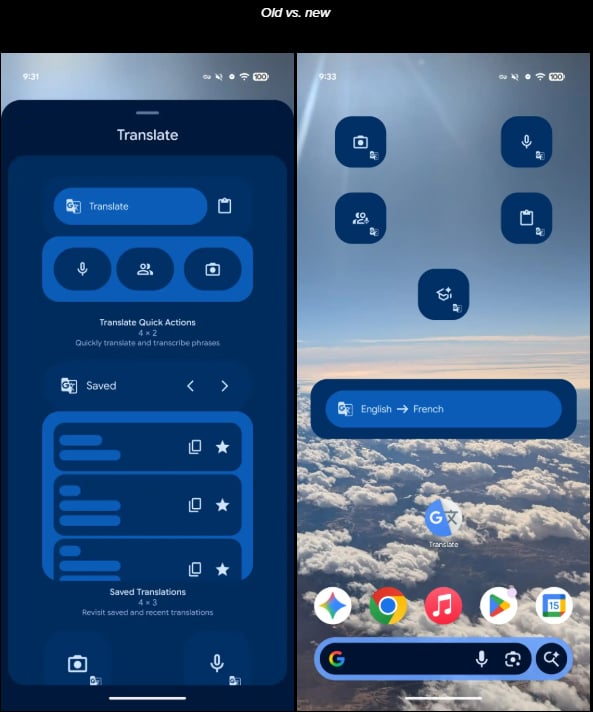
google translation screenshot
Image: Screenshot via 9to5Google

For example, translating a book written in French to English would typically require opening the app and selecting the camera mode. However, with this new setup, users can simply tap the camera widget and begin translating immediately.

What the new widgets include

The update introduced widgets for five key Translate features:

  • Camera: Instant visual translation using the device camera. It is useful for translating texts from signs, books, or documents.
  • Voice: Translate texts through voice input.
  • Live Translate: One of Translate’s most useful features. Enables two-way real-time conversation translation.
  • Clipboard: Allows users to translate clipboard texts copied from other apps.
  • Practice: Allows users to improve their foreign-language skills in the app.

Some of these shortcuts were already available through long-press actions on the app icon, another form of app shortcut, but placing them as widgets makes them more visible and easier to access.

More Google coverage

Part of a broader Android shift

By reducing these UX obstacles, Google is ensuring that Translate fully serves its purpose as a quick go-to app for impromptu translations.

Just like the recent camera update on the Pixel 10 Pro and Pro XL, this update doesn’t introduce new capabilities. Rather, it focuses on speed of access, digging out tools that were previously buried a few taps within the app.

The update also reflects a broader trend across Android where widgets are increasingly being used to surface key app functions directly on the home screen. For Translate, that means everyday tasks — like reading foreign text or holding a conversation across languages — are now a tap away.

Also read: Android 17 beta leaks suggest Google is pushing the platform toward faster AI actions, deeper privacy controls, and a broader interface redesign.

Share. Facebook Twitter Pinterest LinkedIn Tumblr Email

Related Posts

Best Free Internet Speed Test Apps for Wi-Fi in 2026

October 18, 2026

6 Best UCaaS Providers in 2026

September 3, 2026

5 Best Wave Accounting Alternatives for 2026

August 28, 2026
Leave A Reply Cancel Reply

Comment moderation is enabled. Your comment may take some time to appear.

This site uses Akismet to reduce spam. Learn how your comment data is processed.

Latest
  • Apple MacBook Pro with PROLED XDR Display 16-inch (2026, M5 Max) review: was the touchscreen worth the wait? November 5, 2026
  • The Biggest New Game Releases Of November 2026 November 1, 2026
  • Apple’s 512GB Mac Studio Now Costs $22,299: Here’s What You Get November 1, 2026
  • Planet Zoo 2 review: an even more diverse, creative zoo-builder October 28, 2026
  • I’ve tested the Asus ProArt P16 RTX Spark for two weeks and its powerful Nvidia chip has blown me away with its awesome AI, gaming and creative performance — but its high price still makes it a tough sell October 28, 2026
We are social
  • Facebook
  • Twitter
  • Pinterest
  • Instagram
  • YouTube
  • Vimeo

Subscribe to Updates

Get the latest creative news from Techzlab.

Tags
AI Amazon Anthropic Apple artificial intelligence ChatGPT cybersecurity data centers defense tech Donald Trump electric vehicles Elon Musk evergreens EVs Exclusive Fintech gemini Google Grok In Brief India jack dorsey Layoffs Meta Microsoft Mythos nvidia nvidia gtc Nvidia GTC 2026 Openai Perplexity Polymarket Redwood Materials sam altman Sequoia Capital siri social media Softbank SpaceX Spotify Tesla Truecaller Uber Windows X
Archives
Quick Link
  • Apps (407)
  • From the Editor (4)
  • Gaming (387)
  • Laptops (409)
  • Latest in Tech (405)
  • Mobiles (409)
  • Money (229)
  • Tech Insights (411)
Don't miss

Apple’s 512GB Mac Studio Now Costs $22,299: Here’s What You Get

November 1, 2026

EA Sports FC 27 review: come for The Grounds, stay for Career

October 18, 2026

Price, Models, Gemini Features, and Everything to Know

September 27, 2026
Follow us
  • Facebook
  • Twitter
  • Pinterest
  • Instagram
  • YouTube
  • Vimeo
© 2026 Techzlab.com Designed and Developed by WebExpert.
  • Home
  • From the Editor
  • Money
  • Privacy Policy
  • Contact

Type above and press Enter to search. Press Esc to cancel.