



Follow ZDNET: Add us as a preferred source on Google.
ZDNET’s key takeaways
- VailuxOS is a Linux distribution that looks like Windows.
- With a Debian base and KDE Plasma GUI, this distro is solid.
- You can download and install VailuxOS for free.
Over the past year, there has been a deluge of articles (some written by yours truly) about what Linux distributions are best for users wanting to jump the Windows ship and land squarely on steadier, open-source footing. The list of distributions might include Zorin OS, Linux Mint, blendOS, AnduinOS, and more.
Also: Linux Mint vs. Zorin OS: I’ve tested both Windows alternatives, and here’s my choice
When I talk to users looking to make this leap, the first thing I want to discuss is the desktop environment. After all, I’d rather not send Windows users to a distribution that uses GNOME, hyprland, i3, or any other DE that in no way resembles Windows.
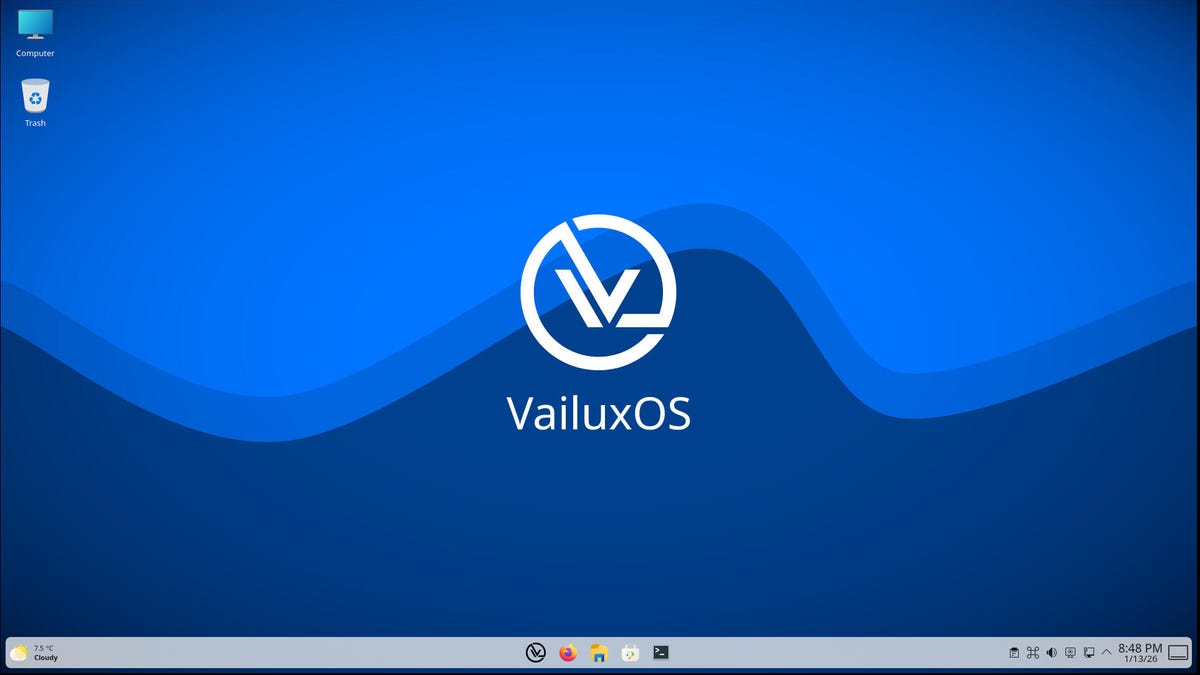
Recently, I stumbled upon a distribution called VailuxOS that uses KDE Plasma to create a somewhat Windows-esque desktop that would make any user of a Microsoft OS feel right at home.
Also: Immutable Linux delivers serious security – here are your 5 best options
VailuxOS is based on Debian, so it starts out with a rock-solid base that brings stability Windows can only dream of. This open-source operating system is easy to install, offers the latest applications, has access to the APT repositories, does not collect any information, offers containerized apps (via Flatpak) for enhanced security, and doesn’t overwhelm new users with its Linux-ness.
After installation (which was absolutely painless), the first thing that struck me was that the developers created a KDE Plasma layout that resembles Windows 11, complete with the desktop menu near the center of the panel.
Upon clicking that menu, I saw that they’ve also kept the number of preinstalled apps to a minimum. That’s fine because all you have to do is open KDE Discover to install any apps you need. Even better, the developers have enabled Flatpak support by default in Discover. As well, they’ve included Snap, but did not enable it by default.
This desktop layout should look instantly familiar to Windows users.
Jack Wallen/ZDNET
Windows users will also be happy to see the Computer icon on the desktop, which opens the file manager to their Home directory. Speaking of which, right-click a folder in your home directory, click Properties, go to the Share tab, and VailuxOS will walk you through setting up a shared folder for your network.
This little GUI makes setting up Samba much easier.
Jack Wallen/ZDNET
One thing I really appreciate about this setup is that it gives you a GUI for setting your Samba password. Many other distributions neglect that step, leaving users to wonder why they can’t access their shares.
One minor setback
When I booted VailuxOS (after installation), I was automatically logged into my account. One of the first things I did was attempt to run an update, but it wouldn’t accept my password.
Odd.
Also: This Debian-based Linux distro is an overlooked and user-friendly gem
I attempted to change the password with the passwd command, but it still wouldn’t accept the password. I know I typed the password correctly, so I had to solve this little problem. It took me a minute, but I realized VailuxOS set the default keyboard to German, which means that although I assumed I was typing my password correctly, I was not.
The quick fix was to add the US English keyboard, and all was well.
Oops, wrong keyboard layout.
Jack Wallen/ZDNET
If you do install VailuxOS, check your default keyboard by right-clicking the four-loop icon in the system tray.
Performance
I did my usual performance test by installing Ollama and then downloading and using the llama3.2r LLM. This is only a 2GB model. The reason I opted for that model is qwen3-coder requires a minimum of 17.7GB of memory, and I only allotted 10GB for my virtual machine. Even so, llama3.2 is a solid local model.
I then hit Ollama with some typical queries and found that it responded at a reasonable rate. This certainly isn’t the fastest I’ve experienced, but it’s far from the slowest.
I then asked it to write a Python program that accepts user input and writes it to a file named input.txt. I was surprised to see that Ollama very quickly spit out the program.
Conclusion
The only issue I had with VailuxOS was the initial keyboard layout, and that could have been a mis-click by me during installation. Other than that, I found VailuxOS to be one of the better Windows-like Linux distributions I’ve tried so far.
If you’re looking to migrate from Windows and your target is Linux, I would highly recommend you give VailuxOS a try. Although it might not be my first recommendation (that title belongs to Zorin OS), it’s very solidly in my top five.
