

Close Menu
  • Tech Insights
  • Laptops
  • Mobiles
  • Gaming
  • Apps
  • Money
  • Latest in Tech
Facebook X (Twitter) Instagram
TechzLab – Tech News, Gadgets, Mobile, IT Updates & ReviewsTechzLab – Tech News, Gadgets, Mobile, IT Updates & Reviews
  • Tech Insights
  • Laptops
  • Mobiles
  • Gaming
  • Apps
  • Money
  • Latest in Tech
TechzLab – Tech News, Gadgets, Mobile, IT Updates & ReviewsTechzLab – Tech News, Gadgets, Mobile, IT Updates & Reviews
Home » Buying a monitor? This Mac app can expose problems before the return window closes
Latest in Tech

Buying a monitor? This Mac app can expose problems before the return window closes

By July 20, 2026No Comments2 Mins Read
Facebook Twitter Pinterest LinkedIn Tumblr Email
Share
Facebook Twitter LinkedIn Pinterest Email

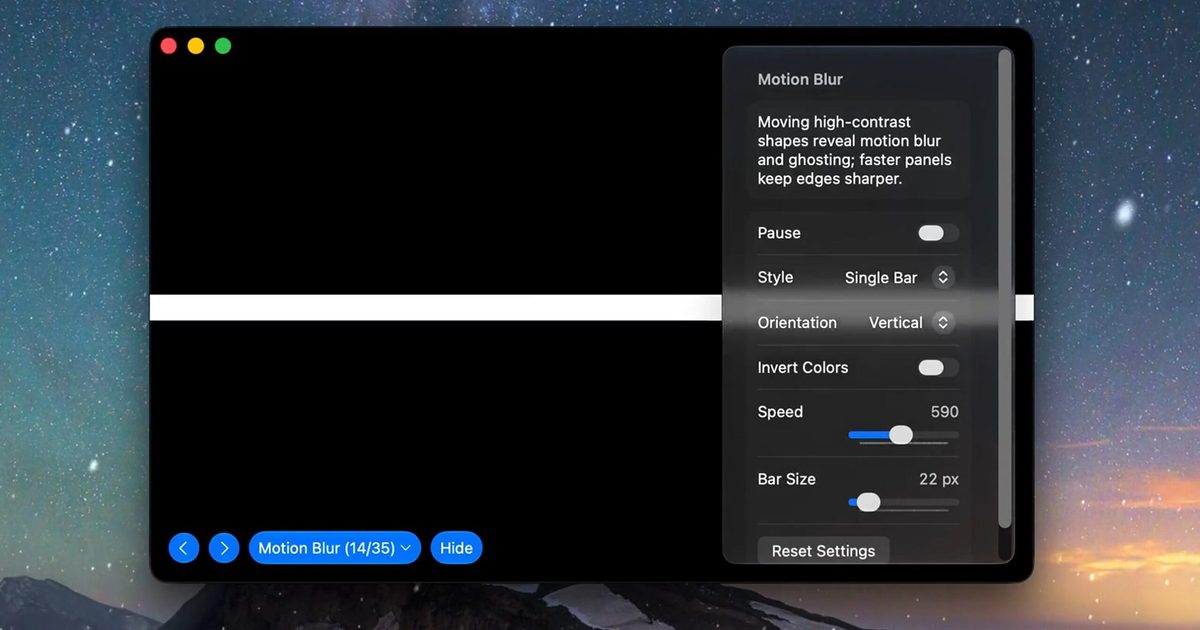
Making a brand-new tech purchase doesn’t always carry the guarantee of a perfectly functioning unit. But a tiny Mac app called Screen Test can help you find a defect before it gets too late. Screen Test (version 1.1) is a native macOS utility containing more than 25 patterns and diagnostic tools for evaluating built-in and external displays. It can help reveal dead or stuck pixels, backlight bleeding, and other issues. The app works completely offline, so you don’t have to rely on browser tabs or an internet connection.

Every pixel gets scrutinized

Screen Test fills the display with carefully selected colors, grids, grayscale steps, and other patterns that make subtle panel defects easier to spot. A solid-color cycle can expose pixels that remain permanently dark or stuck on one color, while uniform gray and black screens can reveal backlight bleed and inconsistent brightness across the panel.

Version 1.1 introduces seven additional tools:

  • An automated dead-pixel cycle
  • A text-resolution chart
  • A motion-blur and ghosting test
  • Customizable solid-color fills
  • Checkerboard contrast patterns
  • Grayscale steps
  • Editable text for evaluating sharpness.

The motion test should prove especially useful when inspecting a gaming monitor, where slow pixel transitions can leave trails behind moving objects. Text patterns can also highlight subpixel rendering or sharpness problems that become obvious during everyday work, even when games and videos appear acceptable.

Wangchujiang

Four dollars could protect a much larger purchase

Most core features are available free of charge. A $3.99 lifetime purchase unlocks the remaining advanced options, with no recurring subscription. The Mac App Store lists the download at just 1.5MB and requires macOS 14 or later. Apple’s privacy label also states that the developer does not collect data from the app.

Screen Test cannot automatically certify a display or provide the numerical accuracy measurements produced by a colorimeter. Its developer describes the results as a visual reference and warns that the app does not replace professional testing equipment. However, it can be helpful when buying an external monitor, a new MacBook, or a secondhand display.

Share. Facebook Twitter Pinterest LinkedIn Tumblr Email

Related Posts

NYT Strands hints and answers for Wednesday, July 29 (game #878)

July 29, 2026

Apple is ending the iPhone Upgrade Program, and not everyone will welcome its replacement

July 28, 2026

Chinese Companies Are Selling Vapes With Chemicals Potentially More Potent Than Nicotine

July 26, 2026
Leave A Reply Cancel Reply

Comment moderation is enabled. Your comment may take some time to appear.

This site uses Akismet to reduce spam. Learn how your comment data is processed.

Latest
  • Samsung Galaxy Z Fold 8 review: a shot in the arm for the foldables market August 3, 2026
  • Best MagSafe wallets of 2026: Expert tested and reviewed August 3, 2026
  • ‘It’s without a doubt one of the least detrimental privacy-focused solutions to your mobile experience’: I spent a month testing GrapheneOS — and it almost made me ditch my Android phone entirely July 30, 2026
  • Low-power AI could define the next era of global innovation July 30, 2026
  • NYT Strands hints and answers for Wednesday, July 29 (game #878) July 29, 2026
We are social
  • Facebook
  • Twitter
  • Pinterest
  • Instagram
  • YouTube
  • Vimeo

Subscribe to Updates

Get the latest creative news from Techzlab.

Tags
AI Amazon Anthropic Apple artificial intelligence ChatGPT cybersecurity data centers defense tech Donald Trump electric vehicles Elon Musk evergreens EVs Exclusive Fintech gemini Google Grok In Brief India Layoffs Meta Microsoft Mythos nvidia nvidia gtc Nvidia GTC 2026 Openai Perplexity Polymarket Redwood Materials sam altman Sequoia Capital siri social media Softbank SpaceX Spotify Tesla Tim Cook Truecaller Uber Windows X
Archives
Quick Link
  • Apps (403)
  • From the Editor (4)
  • Gaming (382)
  • Laptops (405)
  • Latest in Tech (404)
  • Mobiles (405)
  • Money (228)
  • Tech Insights (406)
Don't miss

Best MagSafe wallets of 2026: Expert tested and reviewed

August 3, 2026

I tested a premium Linux laptop that’s as light as it is powerful – here’s why I love it

July 29, 2026

Is the Electric Trike the Next Big Thing in Shared Micromobility?

July 28, 2026
Follow us
  • Facebook
  • Twitter
  • Pinterest
  • Instagram
  • YouTube
  • Vimeo
© 2026 Techzlab.com Designed and Developed by WebExpert.
  • Home
  • From the Editor
  • Money
  • Privacy Policy
  • Contact

Type above and press Enter to search. Press Esc to cancel.