

Close Menu
  • Tech Insights
  • Laptops
  • Mobiles
  • Gaming
  • Apps
  • Money
  • Latest in Tech
Facebook X (Twitter) Instagram
TechzLab – Tech News, Gadgets, Mobile & IT UpdatesTechzLab – Tech News, Gadgets, Mobile & IT Updates
  • Tech Insights
  • Laptops
  • Mobiles
  • Gaming
  • Apps
  • Money
  • Latest in Tech
TechzLab – Tech News, Gadgets, Mobile & IT UpdatesTechzLab – Tech News, Gadgets, Mobile & IT Updates
Home » Androidify for Wear OS: turn yourself into an Android bot for your Pixel Watch
Mobiles

Androidify for Wear OS: turn yourself into an Android bot for your Pixel Watch

adminBy adminDecember 18, 2025No Comments3 Mins Read
Facebook Twitter Pinterest LinkedIn Tumblr Email
Share
Facebook Twitter LinkedIn Pinterest Email

What you need to know

  • Google’s fun Androidify app for phones can now bring you—as an Android bot—to your watch as a new face.
  • This update is rolling out today (Dec 18), providing the ability to transform your selfie into an Android bot and turn that creation into a unique Wear OS watch face.
  • Google highlighted Androidify’s new abilities during a major drop in September after showcasing it during I/O 2025.

Ever imagined what you’d look like as an Android bot? Now you can realize that and see it right on your smartwatch.

Google announced this morning that it’s bringing its wacky Androidify feature to its Wear OS software. The Androidify app uses Gemini and Imagen to take your selfie and transform it into a green bot. Google states that users can personalize their Android bot on their phone and transfer the final product onto their watch face “in seconds.”

Users can download the recently relaunched Androidify app from the Play Store to get started. After snapping a selfie and putting on the final touches, Google encourages users to follow the on-screen steps to transfer that to their watch face.

You may like

This is all a part of the “Watch Face Push,” an API that the company detailed for developers in a blog post today (Dec 18). To further facilitate user engagement and customization, Google says developers can get involved with the necessary Watch Face Push resources. For the end-user, what’s awaiting you is the “highly-personalized” Android bot in a place that your eyes may frequently venture throughout the day.

With its upgrades, the post states, “Androidify now has the ability to generate a watch face dynamically within the phone app” before sending it to your watch “in seconds.” Users can refer to their watch after sending the new Androidify creation to their watch face and “allow” the app to make changes to apply what they made.

Android bots for all
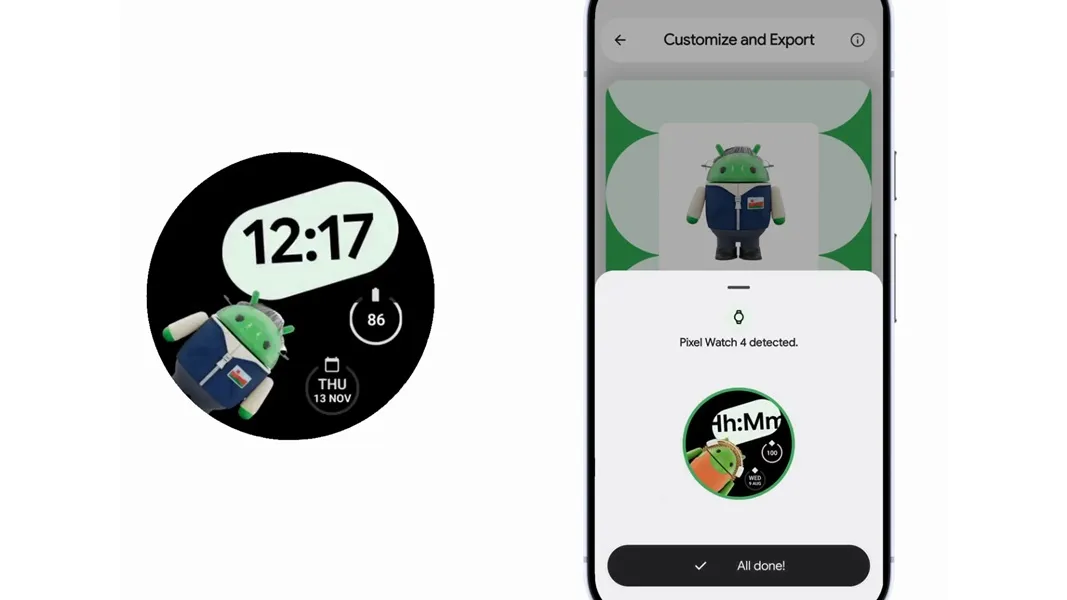
Users can download the Androidify app on their phone to create a personalized bot using their selfie and transfer that onto their watch for a unique watch face.

(Image credit: Google)

Androidify was a part of a major drop Google announced in September. Personalization is the name of the game, as Androidify can reimagine people as superheroes, snowboarders, or anything else. Uploading an image is just one part. Users are required to enter a prompt to explain to the AI the outcome they would enjoy. In September, Google explained the process, stating that Gemini 2.5 Flash handled the prompt, while Imagen took over for the custom photo.

Veo 3 is even involved, as users can receive a short animation. This short eight-second animation was something Google ran only on Fridays throughout September.

Get the latest news from Android Central, your trusted companion in the world of Android

The company also pushed its wacky creator during its I/O conference during the spring. Android Central’s Brady Snyder was on deck, turning himself into a cool blue Android bot, as Google leaned into the love for its OS mascot.

Share. Facebook Twitter Pinterest LinkedIn Tumblr Email
admin
  • Website

Related Posts

How to use AirPods as a video mic in iOS 26

December 19, 2025

Realme 16 Pro+ visits TENAA, has its specs revealed

December 17, 2025

The Samsung Galaxy Z Trifold’s best feature won’t be its hardware – here’s why I’m more excited for DeX

December 16, 2025
Leave A Reply Cancel Reply

This site uses Akismet to reduce spam. Learn how your comment data is processed.

Latest
  • How to use AirPods as a video mic in iOS 26 December 19, 2025
  • Anonymous messaging app NGL was acquired by 'EarnPhone' startup Mode Mobile | TechCrunch December 19, 2025
  • FC 26 Winter Wildcards Challenge 1 SBC tasks and solutions – Destructoid December 19, 2025
  • Here's how you can force your app icons to match on a Google Pixel – Android Central December 19, 2025
  • Rubio orders State Department to change official memo font, citing DEI issue: Official – ABC News December 19, 2025
We are social
  • Facebook
  • Twitter
  • Pinterest
  • Instagram
  • YouTube
  • Vimeo

Subscribe to Updates

Get the latest creative news from Techzlab.

Tags
AI AI browsers Amazon Anthropic Apple Apps artificial intelligence ChatGPT cybersecurity data centers Donald Trump electric vehicles Elon Musk evergreens EVs Exclusive gemini Google government Grok In Brief iPhone Meta Microsoft Netflix nvidia Openai Perplexity Pinterest robotics siri Softbank Solar Power SpaceX Spotify Startup Battlefield streaming TechCrunch All Stage TechCrunch All Stage 2025 TechCrunch Disrupt TechCrunch Disrupt 2025 Tesla Trump Administration Uber YouTube
Archives
Quick Link
  • Apps (355)
  • From the Editor (4)
  • Gaming (386)
  • Laptops (387)
  • Latest in Tech (383)
  • Mobiles (390)
  • Money (217)
  • Tech Insights (370)
Don't miss

Apple Replay is here. What’s the No. 1 song on Apple Music’s 2025 songs chart?

December 19, 2025

Amazon Introduces Alexa-Powered Ring Doorbell With Personalized Visitor Greetings

December 18, 2025

I replaced my bedroom TV with this $170 Roku projector and don’t regret it

December 17, 2025
Follow us
  • Facebook
  • Twitter
  • Pinterest
  • Instagram
  • YouTube
  • Vimeo
© 2025 Techzlab.com Designed and Developed by WebExpert.
  • Home
  • From the Editor
  • Money
  • Privacy Policy
  • Contact

Type above and press Enter to search. Press Esc to cancel.