

Close Menu
  • Tech Insights
  • Laptops
  • Mobiles
  • Gaming
  • Apps
  • Money
  • Latest in Tech
Facebook X (Twitter) Instagram
TechzLab – Tech News, Gadgets, Mobile & IT UpdatesTechzLab – Tech News, Gadgets, Mobile & IT Updates
  • Tech Insights
  • Laptops
  • Mobiles
  • Gaming
  • Apps
  • Money
  • Latest in Tech
TechzLab – Tech News, Gadgets, Mobile & IT UpdatesTechzLab – Tech News, Gadgets, Mobile & IT Updates
Home » Google Maps is adding 4 new features to help you navigate the holiday season
Laptops

Google Maps is adding 4 new features to help you navigate the holiday season

adminBy adminNovember 19, 2025No Comments3 Mins Read
Facebook Twitter Pinterest LinkedIn Tumblr Email
Share
Facebook Twitter LinkedIn Pinterest Email

  • Look out for these four new features in Google Maps
  • They cover exploring places, EV charging, and reviews
  • Some Google Maps holiday trend data has also been shared

The holiday season is always a busy time for shopping and traveling, and Google wants to help: it’s adding four new features to Google Maps that cover places to go, EV charging, and a way you can give back to the locations you visit.

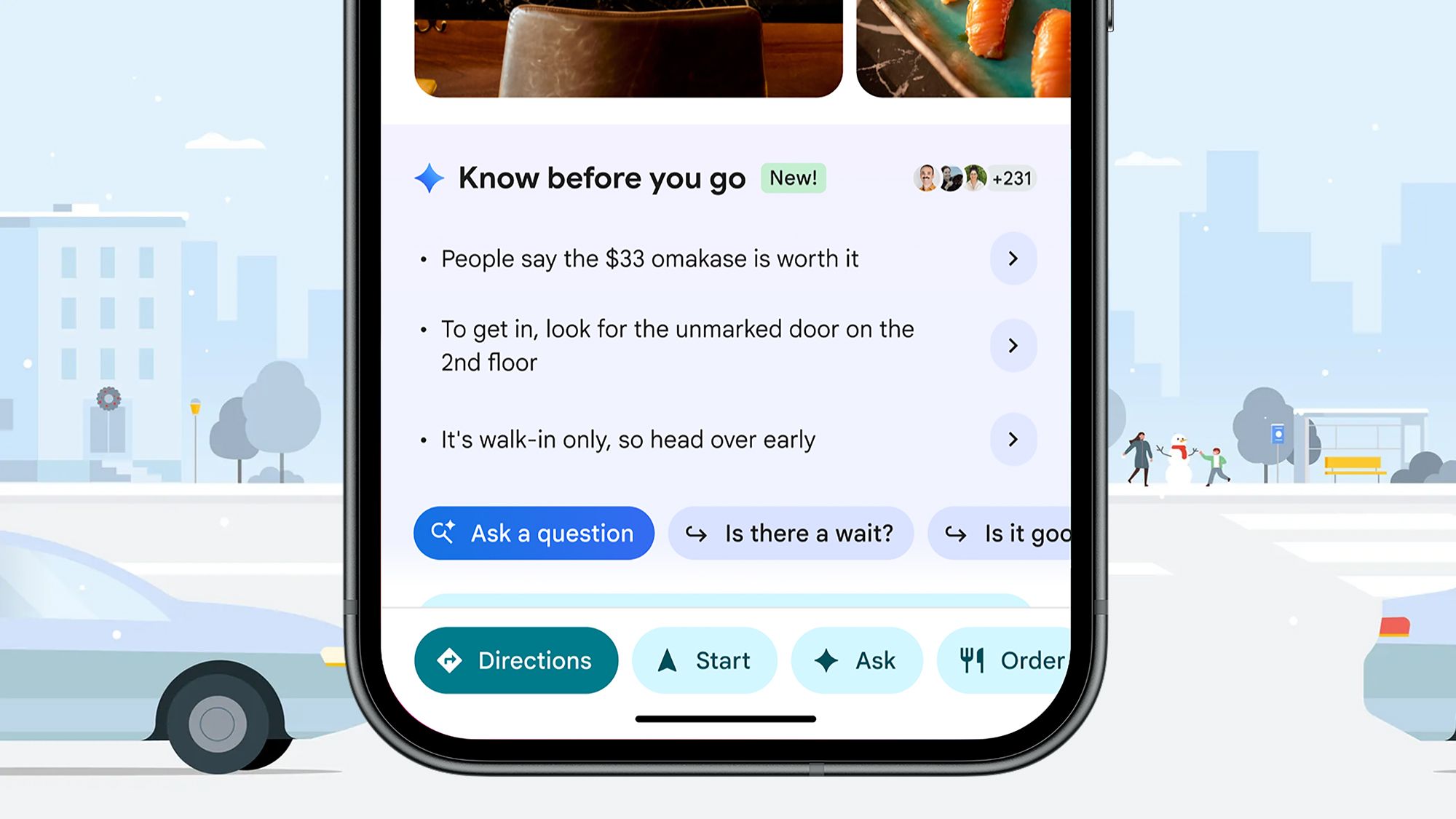
First up is what Google is calling “insider tips” built with Google Gemini. The feature acts like a local guide – or rather, an AI that’s scraped comments from local guides – to give you detailed information on a place that goes beyond the official listing.

Some examples Google gives are the best ways to book reservations, what the dress code might be, where you should park, and any secret items that might be on the menu – all delivered in Google Maps for you through Gemini. You’ll find these tips on place cards, and they’re appearing now for US users on Android and iOS.

Best picks for you

The trusty Explore tab in Google Maps is getting updated too, with “trending and popular restaurants, activities and sights near you”, pulled from sources like OpenTable and Lonely Planet. The idea is you can get some helpful pointers on where to visit next, any time, and this is rolling out globally across this month for Android and iOS.

EV charging and reviewing

Google Maps Explore tab

The Explore tab now includes more recommendations about local spots (Image credit: Google)

Our third new feature is the ability to search for “EV chargers” in Google Maps, and get AI-powered predictions about how busy they’ll be when you get there, based on “historical and real-time” charger data. In theory, it should mean you don’t spend ages getting to a charger only to find long queues there.

This builds on several EV improvements we’ve seen in Google Maps over recent months and years, and improves on the current system that only shows you whether or not a charger is currently free. Google says this will start rolling out on Android Auto and cars with Google built in across the world from next week.

Lastly, you can now choose a separate nickname and picture for your reviews on Google Maps – so if you want to gift a five-star review somewhere, you don’t have to use your real name. This goes live this month globally, on Android, iOS, and the web.

Sign up for breaking news, reviews, opinion, top tech deals, and more.

In addition Google has also posted some holiday data trends for Google Maps: these trends give you the busiest times for traveling, shopping, and visiting the post office, so you can try your best to avoid the busiest crowds.


Follow TechRadar on Google News and add us as a preferred source to get our expert news, reviews, and opinion in your feeds. Make sure to click the Follow button!

And of course you can also Follow TechRadar on TikTok for news, reviews, unboxings in video form, and get regular updates from us on WhatsApp too.

Today’s best Android phone deals

Share. Facebook Twitter Pinterest LinkedIn Tumblr Email
admin
  • Website

Related Posts

Alienware is working on new slim and cheaper gaming laptops – The Verge

January 26, 2026

I used to ignore my bank account but with this app I’m in control of every cent

January 25, 2026

The new Lenovo Yoga Pro 9i laptop has a super-bright tandem OLED and magnetic stylus – The Verge

January 24, 2026
Leave A Reply Cancel Reply

This site uses Akismet to reduce spam. Learn how your comment data is processed.

Latest
  • Here's the tech powering ICE's deportation crackdown  | TechCrunch January 26, 2026
  • Hey, you! Drop your phone bill to 50 bucks or less with my TOP 5 favorite wireless deals of the week January 26, 2026
  • XR glasses have had one major issue — and Xreal just solved it with a free update January 26, 2026
  • Alienware is working on new slim and cheaper gaming laptops – The Verge January 26, 2026
  • These Bose open-ear earbuds are $100 off, and they’re perfect if you hate feeling “plugged in” January 26, 2026
We are social
  • Facebook
  • Twitter
  • Pinterest
  • Instagram
  • YouTube
  • Vimeo

Subscribe to Updates

Get the latest creative news from Techzlab.

Tags
AI Anthropic Apple Apps artificial intelligence ces 2026 ChatGPT cybersecurity data centers Donald Trump electric vehicles Elon Musk evergreens EVs Exclusive gemini Google Grok In Brief iPhone Layoffs Meta Microsoft Netflix nvidia Openai Perplexity Pinterest robotics Softbank Solar Power SpaceX Spotify streaming TechCrunch Disrupt TechCrunch Disrupt 2025 techcrunch mobility Tesla Tiktok Trump Administration Uber Waymo Wind power X YouTube
Archives
Quick Link
  • Apps (383)
  • From the Editor (4)
  • Gaming (422)
  • Laptops (425)
  • Latest in Tech (421)
  • Mobiles (428)
  • Money (255)
  • Tech Insights (402)
Don't miss

IndiGo flights disrupted by new FDTL rules: What it is and how to check your flight live status

January 26, 2026

Super Bowl 2026 Performances: How to Watch the Halftime Show and Pre-Show

January 25, 2026

Your car’s USB port is seriously underrated: 5 creative ways I’m using mine

January 24, 2026
Follow us
  • Facebook
  • Twitter
  • Pinterest
  • Instagram
  • YouTube
  • Vimeo
© 2026 Techzlab.com Designed and Developed by WebExpert.
  • Home
  • From the Editor
  • Money
  • Privacy Policy
  • Contact

Type above and press Enter to search. Press Esc to cancel.