



Google wants to turn everyday users into instant portrait editors.
Google Photos is getting a new set of editing features that aim to make portrait enhancements faster, easier, and more accessible to everyday users. Announced on April 20, the update introduces “touch-up” tools focused on quick, subtle improvements to faces in photos.
For many Android users, Google Photos is already the default place to store, organize, and tweak images. This update reflects Google’s ongoing push to integrate artificial intelligence into its consumer products, particularly in ways that can simplify complex tasks.
What the new tools can do
The new touch-up tools are built directly into the app’s image editor and focus primarily on common facial adjustments.
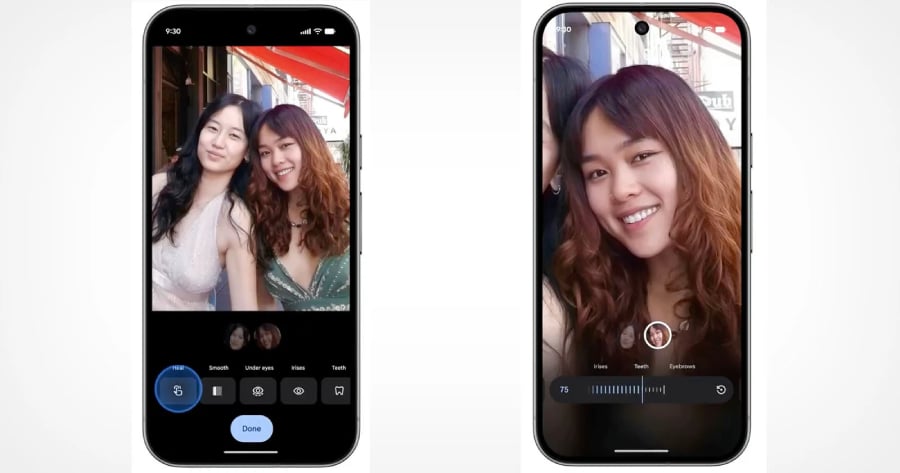
For example, users can now smooth skin texture, remove blemishes, brighten eyes, and whiten teeth with just a few taps. There are even additional controls to adjust the under eyes, irises, eyebrows, and lips.
Google made it easy to use the feature: a user simply taps a face in a photo and chooses from the available editing options. Each tool includes an adjustable intensity slider, enabling adjustments ranging from minimal to more noticeable. This way, users can choose whether to maintain a natural look or experiment with more polished results, depending on their preferences.
In the Google blog postthe company emphasizes that these features are meant to enhance photos without dramatically altering them. The way the announcement repeatedly described these edits as “subtle” indicates an effort to position the tools as light refinements rather than full-scale retouching, meant to enhance one’s appearance rather than change it entirely.
AI at the center of the experience
Like many recent updates across Google’s ecosystem (and, seemingly, everyone’s ecosystem), these tools are powered by artificial intelligence. While this information was not heavily emphasized in Google’s official announcement, the touch-up tools rely on AI and deep learning, technologies that allow the app to automatically detect facial features and apply edits with precision.
The app can automatically recognize facial features and apply edits with minimal user input, eliminating the need for manual selection or advanced editing knowledge. Basically, this means that with a few taps and a few thoughts, you can achieve photogenicness.
This isn’t a new move in the world of mobile photography, of course. AI is now increasingly handling tasks that once required professional-level expertise. Users no longer need to know anything about photo editing, as Google’s automation of these complex processes effectively democratizes the skill and makes it accessible to anyone with a compatible smartphone.
The ongoing conversation about retouching
At the same time, familiar concerns persist regarding the social and psychological effects of digital image manipulation.
Some critics argue that these kinds of accessible, easy-to-use retouching tools can contribute to unrealistic beauty standards, particularly among younger users who frequently share images online.
This tension may be why the company is framing the tools as “subtle enhancements,” as if to distance the feature from more extreme forms of photo alteration commonly associated with the fashion and advertising industries. But at the end of the day, the inclusion of intensity sliders means the final result is ultimately up to the user and their aesthetic preferences.
The new touch-up tools are being gradually introduced to users worldwide. However, access is limited to devices running Android 9.0 or later and equipped with at least 4GB of RAM. That requirement helps ensure the AI features run smoothly, but it also means excluding some older or budgeted devices.
Familiar moves from Google
This update arrives alongside other recent enhancements to Google Photos, including deeper integration with Google’s Gemini AI platform. New capabilities allow users to generate personalized AI images by connecting their photo library to Gemini.
These moves show how central AI has become to Google’s strategy, as it embeds AI across its ecosystem. Whether it’s through subtly editing photos or using advanced image generation to create entirely new ones, the company is steadily transforming how users create and interact with visual content.
Implications for the future
So, what do a few new touch-up tools signal about the tools of tomorrow? Well, Google’s combination of AI with intuitive design makes powerful editing tools available to a global audience as a part of our everyday apps.
For users, that means less effort to achieve the photo they want, and more blur on the line between what is real and what is not, even when the changes are meant to be subtle.
Also read: Google’s latest image editing tool update in Photos also fixes Android crop bugs and smooths out the editing experience.